In the realm of data storage, hardware failure is not a probability; it is an absolute certainty. Every physical storage medium, whether a spinning magnetic Hard Disk Drive (HDD) or a flash-based Solid State Drive (SSD), possesses a finite lifespan. When managing critical infrastructure—from a high-end video editing workstation to a multi-bay Network Attached Storage (NAS) server—relying on a single physical drive is akin to walking a tightrope without a safety net.
To mitigate the catastrophic impact of hardware failure, the technology industry relies on a foundational architecture known as RAID: Redundant Array of Independent Disks (formerly “Inexpensive Disks”). RAID is a storage virtualization technology that combines multiple physical disk drive components into one or more logical units.
The primary goals of RAID are two-fold: to increase data redundancy (fault tolerance) and to improve overall read/write performance. This comprehensive guide breaks down the underlying mechanics of RAID, explores the various standard configurations (RAID levels), and explains how to choose the correct architecture for your specific data storage needs.
1. The Core Mechanics: Striping, Mirroring, and Parity
Before diving into the specific numbered RAID levels, it is crucial to understand the three fundamental concepts that RAID controllers use to manipulate data across multiple drives.
Mirroring: This is the simplest form of redundancy. The system writes the exact same data to multiple drives simultaneously. If one drive fails, the exact duplicate continues to operate flawlessly. Mirroring offers supreme fault tolerance but sacrifices storage efficiency, as half of your purchased capacity is used purely for duplication.
Striping: This technique focuses entirely on performance. The RAID controller breaks a single file down into smaller blocks (stripes) and writes these blocks across multiple drives simultaneously. Because multiple drives are working in parallel to read or write the data, performance scales linearly. However, standard striping offers zero redundancy; if one drive in the stripe dies, the entire file is destroyed.
Parity: This is a complex mathematical function (usually an XOR operation) used to achieve redundancy without sacrificing 50% of your storage space. The system calculates a mathematical “checksum” of your data and stores it across the drives. If a drive fails, the RAID controller uses the surviving data and the parity data to reverse-engineer and perfectly reconstruct the missing data.
2. RAID 0: Striping for Maximum Performance
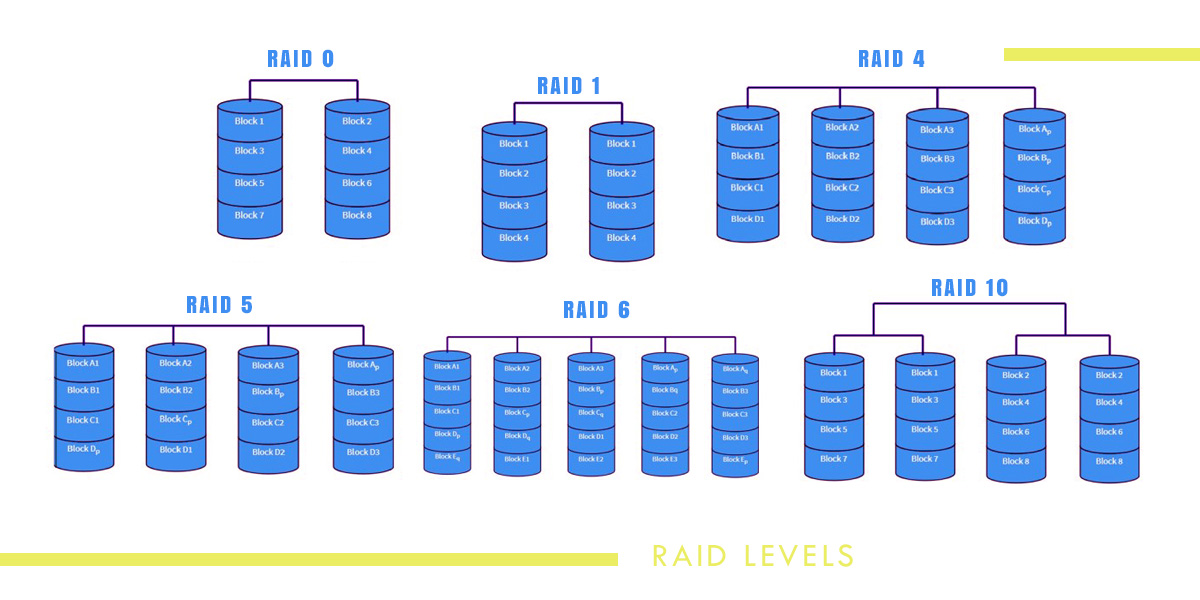
RAID 0 is designed with a single goal in mind: blistering speed. It utilizes striping across two or more drives without any mirroring or parity.
How it Works: If you save a 1GB video file to a two-drive RAID 0 array, the controller splits the file in half, simultaneously writing 500MB to Drive A and 500MB to Drive B.
The Advantages: Both read and write speeds are theoretically multiplied by the number of drives in the array. Two 150 MB/s HDDs in RAID 0 can perform at nearly 300 MB/s. Furthermore, you get 100% storage efficiency; two 4TB drives yield 8TB of usable space.
The Disadvantages:Zero Redundancy. RAID 0 provides absolutely no fault tolerance. In fact, it multiplies your risk. Because the file is fragmented across all drives, if any single drive in a RAID 0 array fails, the entire array crashes, and 100% of the data is permanently lost.
Optimal Use Cases: RAID 0 should never be used for storing critical data. It is exclusively utilized for “scratch disks”—temporary storage used for rendering 3D graphics, compiling massive codebases, or editing high-bitrate 8K video, where maximum throughput is required and the original source files are safely backed up elsewhere.
3. RAID 1: Mirroring for Uncompromising Reliability
RAID 1 represents the most straightforward approach to data protection. It requires a minimum of two drives and utilizes pure mirroring.
How it Works: Every time the operating system issues a write command, the RAID controller writes the exact same data to both Drive A and Drive B. To the computer, they appear as a single drive.
The Advantages: Exceptional reliability. The array can sustain the complete physical failure of one drive with zero data loss and zero downtime. Furthermore, read performance is often enhanced, as the controller can read different blocks of data from both drives simultaneously. Rebuilding a RAID 1 array after replacing a dead drive is fast and computationally simple (it is just a 1:1 copy).
The Disadvantages: Terrible storage efficiency. You only get 50% of your total purchased capacity. Buying two 10TB drives will only yield 10TB of usable space. Write speeds are not improved, as the data must be completely written to both drives.
Optimal Use Cases: Operating system boot drives, small business accounting databases, and critical document storage where absolute data integrity is more important than massive storage capacity.
4. RAID 5: The Traditional Standard (Striping with Distributed Parity)
For decades, RAID 5 has been the standard configuration for business servers and home NAS devices. It offers a highly appealing compromise between storage capacity, performance, and redundancy. It requires a minimum of three drives.
How it Works: RAID 5 stripes data across all the drives in the array, providing a significant boost to read speeds. However, alongside the data, it also calculates and stripes parity blocks. The parity data is distributed evenly across all drives, rather than being bottlenecked on a single dedicated parity drive.
The Advantages: You achieve excellent read performance and the ability to survive a single drive failure. Storage efficiency is calculated as N - 1 (Total Capacity minus one drive). If you buy four 8TB drives (32TB raw), you get 24TB of usable space, with 8TB dedicated to parity.
The Disadvantages: RAID 5 suffers from a “write penalty.” Every time you write data, the system must perform complex XOR calculations to generate the parity, slowing down write operations.
The Danger of Modern Rebuilds: If a drive fails in RAID 5, the array enters a vulnerable “degraded” state. When you insert a new replacement drive, the controller must read every single sector of the surviving drives to mathematically rebuild the missing data. With massive modern drives (16TB+), this rebuild process can take days, putting extreme stress on the remaining hardware. If a second drive fails, or encounters an Unrecoverable Read Error (URE) during this grueling rebuild process, the entire array is destroyed. For this reason, many IT professionals now consider RAID 5 obsolete for massive drives.
5. RAID 6: Double Parity for Massive Arrays
RAID 6 is the direct evolutionary successor to RAID 5, designed specifically to address the vulnerabilities associated with massive, high-capacity hard drives. It requires a minimum of four drives.
How it Works: It operates identically to RAID 5, striping data across the disks for performance. However, instead of calculating one layer of parity, it calculates two independent layers of parity and distributes both across the array.
The Advantages: Extreme fault tolerance. A RAID 6 array can withstand the simultaneous failure of two hard drives without losing any data. This completely solves the RAID 5 rebuild problem; if a drive dies, and a second drive crashes during the stressful rebuild process, your data remains perfectly safe. Storage capacity is N - 2.
The Disadvantages: The write penalty is even more severe than RAID 5 because the controller must calculate two separate mathematical parity algorithms for every write operation. It also requires sacrificing the capacity of two full drives.
Optimal Use Cases: Large-scale NAS enclosures, enterprise storage servers, and archival arrays utilizing large capacity drives (8TB, 12TB, 20TB, etc.) where data retention is critical and rebuild times are expected to be lengthy.
6. Nested RAID: RAID 10 (Striping Mirrors)
Nested RAID configurations combine multiple RAID levels to capture the benefits of both while mitigating their weaknesses. The most common and highly regarded nested configuration is RAID 10 (also known as RAID 1+0). It requires a minimum of four drives and must be built in even numbers (4, 6, 8, etc.).
How it Works: RAID 10 is a “stripe of mirrors.” If you have four drives, the system first creates two independent RAID 1 mirrored pairs (Pair 1: Drives A+B. Pair 2: Drives C+D). Then, the system places a RAID 0 stripe across the top of those two pairs.
The Advantages: The holy grail of storage architecture. You get the blistering read/write performance of RAID 0 without any complex parity calculations slowing down the processor. Simultaneously, you get the extreme fault tolerance of RAID 1. It can sustain multiple drive failures, provided the failures do not occur within the same mirrored pair. Rebuild times are astonishingly fast because replacing a dead drive simply requires a 1:1 copy from its surviving mirror partner.
The Disadvantages: Like RAID 1, it requires a 50% capacity sacrifice. Buying four 10TB drives will only yield 20TB of usable space, making it a very expensive architecture to deploy at scale.
Optimal Use Cases: Highly transactional enterprise databases (SQL servers), high-density virtual machine (VM) hosting, and mission-critical applications that demand the absolute highest performance and the lowest possible rebuild risk.
7. Software RAID vs. Hardware RAID vs. Modern File Systems
How the RAID math is calculated fundamentally changes the architecture of the system.
Hardware RAID: Historically, servers relied on dedicated PCIe RAID Controller cards. These cards had their own processors and onboard RAM cache. The card handled all the heavy parity mathematics, hiding the physical drives from the operating system and presenting only a single logical volume. While powerful, if the RAID card itself died, you often needed the exact same model of card to recover your data.
Software RAID: Modern CPUs are so powerful that dedicating a separate physical card to calculate parity is no longer necessary. Software RAID (like mdadm in Linux) uses the host computer’s CPU to manage the array. It is highly flexible and hardware-agnostic; you can move the drives to a completely different motherboard, and the OS will still recognize the array.
Next-Generation File Systems (ZFS & Btrfs): Modern storage goes beyond standard RAID by integrating array management directly into the file system itself. ZFS (used in TrueNAS) utilizes RAID-Z, which eliminates the infamous “write hole” vulnerability of traditional hardware RAID. These file systems perform checksums on every single block of data as it is read; if they detect “silent data corruption” (bit rot), they instantly grab the correct data from the parity block and self-heal the corrupted file on the fly, a feat impossible with traditional hardware RAID.
8. The Golden Rule of Storage: RAID is NOT a Backup
This is the most critical concept in this entire guide. IT professionals repeat this mantra constantly: RAID is for High Availability, not for Data Protection.
RAID is designed to protect you from one specific event: physical hardware failure. It ensures that if a hard drive motor burns out at 3:00 AM, your business website doesn’t go offline, and your data remains accessible.
However, RAID will not protect you from:
User Error: If you accidentally delete an important folder, the RAID controller immediately mirrors that deletion across all drives instantly. The file is gone.
Malware and Ransomware: If a virus encrypts your files, the RAID controller dutifully writes the encrypted, useless data across your massive, redundant array.
Catastrophic Disaster: A fire, a massive power surge, or a thief stealing the physical server will destroy all the drives in the array simultaneously, regardless of what RAID level you were running.
To actually protect your data, a robust RAID architecture must be combined with a comprehensive, off-site backup strategy, ensuring that multiple versions of your files exist in geographically separate locations.