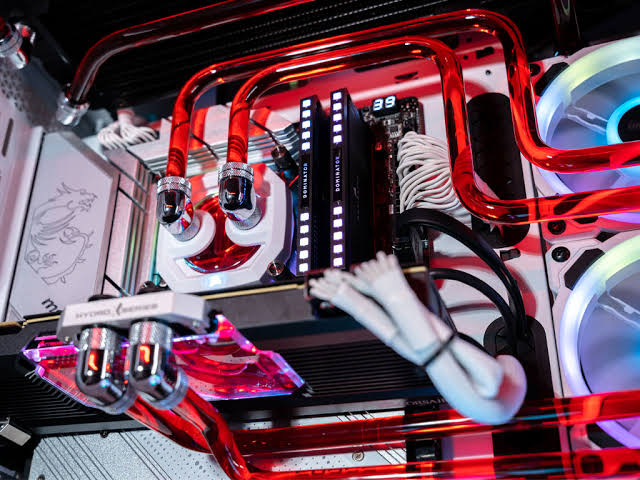
While All-In-One (AIO) liquid coolers offer a convenient, sealed solution for mainstream users, the absolute pinnacle of thermal engineering and desktop aesthetics is the Custom Open-Loop Liquid Cooling System.
Unlike a closed AIO unit, a custom loop is built piece by piece. The enthusiast manually selects and interconnects every component: the CPU block, GPU water block, heavy-duty radiators, variable-speed pumps, rigid or flexible tubing, and an external reservoir. This architecture allows a single unified loop to intercept heat from both the processor and the graphics card simultaneously, routing it through massive radiators capable of dissipating over 1,000 watts of thermal energy in virtual silence.
However, custom loops introduce a level of mechanical complexity, maintenance overhead, and financial commitment that transforms PC building from a technical hobby into a rigorous engineering discipline. This comprehensive guide explores the thermodynamic advantages of custom loops, evaluates the chemistry of cooling fluids, and establishes the strict maintenance protocols required to prevent catastrophic failure.
1. The Thermodynamic Advantages of Custom Loops
A custom loop outperforms even the largest AIO or dual-tower air cooler for three primary reasons:
- Surface Area Scaling: A standard AIO is typically limited to a single 360mm or 420mm radiator. In a custom loop, you can chain multiple massive radiators together (e.g., a dual 360mm or 480mm configuration) inside a large chassis. More surface area means the coolant temperature stays exceptionally close to ambient room temperature, even under hours of maximum sustained load.
- Full-Coverage GPU Blocks: Factory graphics card coolers rely on air blowing over a local heatsink. A custom GPU water block replaces the entire factory cooling assembly with a solid, CNC-machined block of nickel-plated copper that bolts directly over the GPU core, the VRAM modules, and the VRMs simultaneously. This drops GPU core and hotspot temperatures by 20°C to 30°C compared to stock air coolers.
- Thermal Mass and Equilibrium: Because a custom loop holds a large volume of liquid (often 0.5 to 1.0 liters or more) inside the reservoir and tubing, it possesses immense thermal inertia. Sudden spikes in CPU or GPU usage are completely absorbed by the massive fluid mass, preventing rapid fan speed ramping and maintaining acoustic stability.
2. The Chemistry of Coolants: Clear vs. Pastel and Additives
One of the most critical and frequently misunderstood aspects of maintaining a custom loop is the choice of fluid running through the copper and acrylic channels. You must never run pure tap water or plain distilled water without specialized chemical additives.
- Galvanic Corrosion: A custom loop often mixes metals—nickel-plated copper blocks, brass fittings, and sometimes copper radiators. If pure water is used, an electrochemical reaction occurs between these dissimilar metals, causing the aluminum or copper to corrode rapidly, creating a metallic sludge that clogs the micro-fins of the blocks. Coolants must include heavy anti-corrosive inhibitors.
- Biological Growth: Organic matter, algae, and bacteria love warm, dark environments with plastic components. If an anti-microbial biocide additive is not present in the fluid, organic growth will colonize the transparent tubes within weeks, turning clear liquid into a cloudy green swamp.
- The Trap of Opaque / Pastel Coolants: Aesthetically, many builders are drawn to milky, opaque white, or pastel-colored coolants. However, these coolants achieve their color by suspending millions of microscopic solid particles in the fluid. Over months of thermal cycling and exposure to heat, these particles inevitably fall out of suspension, cementing themselves inside the microscopic pin-fins of the CPU block like concrete, completely choking the fluid flow and causing thermal failure. For reliable long-term operation, experienced builders strictly use clear, dyed coolants with anti-corrosive and biocide properties (such as Mayhems X1 or Corsair XLF).
3. Maintenance Protocols: Flushing, Cleaning, and Teardown
Unlike an AIO that is thrown away when it fails, a custom loop is a permanent, modular infrastructure that demands active, scheduled maintenance.
- The Annual Flush: Once a year (or every 12 to 18 months), a custom loop must be completely drained, flushed with distilled water, treated with a specialized cleaning solution (like Mayhems Blitz Part 2) to strip organic and chemical residue, and refilled with fresh coolant.
- Block Inspection: During the annual flush, the CPU and GPU water blocks should be physically unbolted and opened. Over time, plasticizer from soft PVC tubing can leach out and coat the internal copper pin-fins in a sticky, greasy film. Physically scrubbing these micro-channels with a soft toothbrush and isopropyl alcohol is required to restore original thermal performance.
2. Emerging Cooling Technologies: Beyond Air and Liquid
As silicon power densities continue to climb relentlessly—with modern high-end processors and enterprise AI accelerators pushing past hundreds of watts into thermal zones that traditional copper blocks struggle to manage—the boundaries of consumer cooling are being forced to expand.
The traditional paradigm of relying solely on air convection and water-to-air radiators is approaching a physical asymptote. To sustain the next generation of computing performance, the industry is researching and commercializing radical alternative cooling methodologies that bypass the limitations of standard thermal physics.
This concluding guide explores the bleeding edge of thermal engineering, examining the mechanics, benefits, and implementation hurdles of immersion cooling, thermoelectric cooling, and phase-change refrigeration systems.
1. Direct-To-Chip Liquid Cooling (Enterprise and High-End Workstations)
While consumer open-loops use water blocks connected to external radiators, enterprise data centers and extreme high-performance workstations are rapidly transitioning to Direct-to-Chip (DTC) Liquid Cooling systems connected to facility-wide cooling infrastructure.
- The Mechanism: Instead of rejecting heat into the ambient air of a room via a PC case radiator, DTC systems pump chilled water (or specialized dielectric fluid) directly through micro-channel cold plates mounted to the processors. The heated fluid is then piped completely out of the server chassis, running through building-wide heat exchangers that dump the thermal energy directly into an outdoor cooling tower or geothermal loop.
- The Advantage: It completely decouples computer performance from room ambient temperature. A server room can be 35°C, but the processors remain chilled because the liquid is supplied by a dedicated external chiller. This technology is becoming mandatory for housing dense clusters of AI training hardware.
2. Single-Phase Immersion Cooling
Imagine taking a fully operational, high-performance computer, removing all the cooling fans and heatsinks, and physically submerging the entire motherboard, RAM, GPUs, and power supply into a large aquarium filled with liquid. This is Immersion Cooling.
- The Fluid: The secret to immersion cooling is not water (which is electrically conductive and would instantly destroy the hardware). Instead, it utilizes a specialized engineered dielectric fluid—a clear, odorless, non-conductive liquid that possesses the physical appearance of water but zero electrical conductivity.
- The Mechanism: Electronic components are dropped directly into the fluid bath. The fluid washes over every single transistor, capacitor, and silicon die simultaneously, absorbing heat via direct, 360-degree liquid contact. Pumps circulate the warm fluid through an external heat exchanger, and it flows right back into the tank.
- The Advantage: It completely eliminates thermal resistance barriers. There are no thermal pastes, no mounting pressure issues, and no localized hot spots. Every single component runs at identical, hyper-stable temperatures, completely eliminating noise while enabling extreme, sustained overclocks.
3. Thermoelectric Cooling (TEC / Peltier Modules)
Thermoelectric Coolers rely on the Peltier Effect—a solid-state active refrigeration phenomenon discovered in the 19th century.
- The Mechanism: A TEC module is a semiconductor sandwich made of alternating N-type and P-type bismuth telluride materials. When direct electrical current is applied to the module, electricity forces heat to move actively from one side of the plate to the other. One side of the plate becomes blistering hot, while the opposite side drops to sub-ambient temperatures (freezing cold).
- The Application: Enthusiast coolers (such as the EK-Quantum Momentum Cooler) place a Peltier module directly between the CPU and the water block, chilling the CPU below room temperature.
- The Fatal Flaw (Condensation): While a TEC can cool a CPU down to 5°C even under a heavy load, dropping hardware below room temperature introduces the laws of meteorology: Dew Point Physics. The moment a component drops below the ambient room temperature, moisture in the air will instantly condense on the cold metal, forming liquid water droplets inside your PC case. Unless the system is painstakingly insulated with closed-cell foam and conformal coatings to prevent short circuits, thermoelectric cooling remains a high-risk, niche technology reserved primarily for extreme benchmarking competitions.