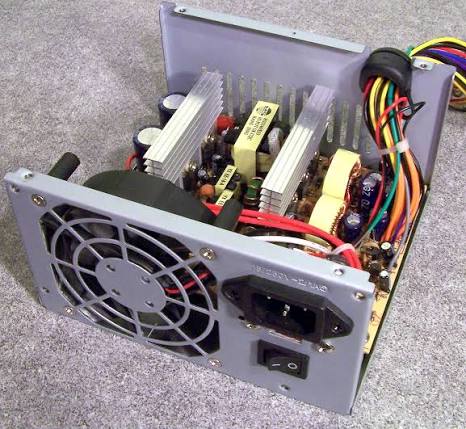
When diagnosing a computer that randomly crashes, restarts, or loses power during heavy workloads, users immediately instinctively blame the CPU or the graphics card. They monitor core temperatures, adjust fan curves, and endlessly stress-test the silicon. However, they frequently ignore the foundational component that keeps the entire machine alive: the Power Supply Unit (PSU).
The PSU is the beating heart of your computer. Its sole purpose is to pull high-voltage Alternating Current (AC) from your wall outlet and meticulously convert it into the low-voltage Direct Current (DC) required by your delicate internal components. This conversion process is an act of violent electrical transformation, and its primary byproduct is immense, concentrated heat.
Unlike a CPU, which will gracefully throttle its speed to survive overheating, a PSU operates on strict, binary safety triggers. If it overheats, it simply shuts the entire system down instantly to prevent a catastrophic fire. This comprehensive guide explores the physics of AC-to-DC conversion efficiency, diagnoses the symptoms of PSU thermal failure, explains the critical importance of capacitor temperature ratings, and outlines the definitive rules for safe PSU mounting and airflow.
1. The Physics of Heat Generation: AC/DC Conversion and Efficiency
To understand why a power supply gets hot, you must understand how it operates on a fundamental thermodynamic level. A PSU is not a perfect machine; it cannot convert 100% of the electricity it pulls from the wall into usable power for your computer.
- The Conversion Loss: If your gaming PC requires 500 watts of DC power to run a game, the PSU might have to pull 600 watts of AC power from the wall outlet to fulfill that request.
- Where Does the Lost Power Go? According to the laws of thermodynamics, energy cannot be destroyed. The “missing” 100 watts of electrical energy is converted directly into pure thermal energy (heat) inside the metal PSU enclosure.
The 80 PLUS Rating System (It’s About Heat, Not Just Electricity Bills)
The industry standard for measuring this conversion efficiency is the 80 PLUS certification. While most consumers view 80 PLUS as a way to save money on their monthly electric bill, IT professionals view it as a strict metric of heat generation.
- 80 PLUS White/Bronze: These budget units are generally around 80% to 85% efficient under load. If your PC demands 800W, a Bronze PSU will pull roughly 975W from the wall. It must instantly dissipate 175 watts of pure heat internally. This requires massive heatsinks and a very loud, high-RPM fan to prevent the unit from melting.
- 80 PLUS Gold/Platinum: The enthusiast standard, sitting around 90% to 92% efficiency. To deliver that same 800W, a Platinum unit might only pull 888W from the wall, generating only 88 watts of heat.
- 80 PLUS Titanium: The bleeding edge of power delivery, achieving 94%+ efficiency.
The Rule: A more efficient PSU generates mathematically less heat. By upgrading from a Bronze to a Titanium PSU, you are not just saving electricity; you are physically stripping nearly 100 watts of heat out of your system’s total thermal footprint, drastically increasing the lifespan of the unit and lowering fan noise.
2. Identifying PSU Thermal Issues and Safety Protections
Because standard software (like HWiNFO64) cannot usually read internal PSU temperatures unless you own a highly specialized digital power supply (like the Corsair AXi series), diagnosing a PSU thermal issue requires identifying physical symptoms and understanding the unit’s internal hardware protections.
The Hard Thermal Shutdown (OTP)
If your computer suddenly goes completely black—no blue screen of death, no freezing, just an instant loss of all power as if someone yanked the cable from the wall—you have likely tripped OTP (Over Temperature Protection).
- Modern, high-quality PSUs feature dedicated thermistors attached to their internal primary heatsinks. If the internal temperature exceeds a critical threshold (usually around 50°C to 55°C ambient internal temperature), the OTP circuit instantly physically breaks the connection to protect the capacitors from boiling and bursting.
- The PC will often refuse to turn back on for 10 to 15 minutes until the internal thermistor cools down and resets the circuit.
The OCP/OPP Confusion
Users often confuse thermal shutdowns with OCP (Over Current Protection) or OPP (Over Power Protection).
- If your PSU is rated for 650W, and your new graphics card suddenly spikes to demand 700W, the OPP will instantly shut the system down.
- The Thermal Link: Heat directly affects a PSU’s maximum power output. A cheap PSU might be advertised as “750W”, but the fine print reveals it can only deliver 750W at a room temperature of 25°C. If the PSU gets hot and reaches 40°C, its internal components lose electrical efficiency, and its actual maximum output might drop to 600W. This means a hot PSU will trigger an OPP shutdown much faster than a cool PSU.
Physical Symptoms of Degradation
- The Smell of Ozone: If you smell a faint, sharp, metallic burning odor (often described as smelling like a hot laser printer) coming from the exhaust vent of your PC case, your PSU’s internal insulation is actively melting due to extreme heat. Turn the PC off immediately.
- Coil Whine Escalation: Extreme heat degrades the dampening material on the internal electromagnetic chokes. A PSU that was previously silent may develop a shrieking, high-pitched “coil whine” as it overheats under load.
3. The Danger of Internal Component Degradation (Capacitors)
The most heat-sensitive components inside a power supply are the electrolytic capacitors. These small, cylindrical components filter the electrical ripple, ensuring that the 12V power delivered to your graphics card is a perfectly smooth, flat line.
Electrolytic capacitors contain a liquid electrolyte. If the PSU runs hot constantly, this liquid slowly evaporates and dries up.
The Temperature Rating (85°C vs. 105°C)
When buying a PSU, professional reviewers meticulously check the origin and rating of the primary capacitors.
- Budget PSUs (Taiwanese/Chinese 85°C): Cheap power supplies use capacitors rated for a maximum operating temperature of 85°C. In a hot, suffocating PC case, the internal temperature of a heavily loaded PSU can easily approach this limit, causing the capacitors to age rapidly, bulge, and eventually leak.
- High-End PSUs (Japanese 105°C): Premium units (like those from Seasonic, Super Flower, or high-end Corsair lines) strictly use premium Japanese capacitors (Nippon Chemi-Con, Rubycon) rated for 105°C. These capacitors can survive brutal thermal environments for over a decade without drying out, which is why premium PSUs offer 10-year or 12-year warranties.
The Ripple Effect
When a capacitor degrades due to heat, it stops filtering the electricity correctly. “Ripple” (electrical noise) enters the DC power lines. This dirty, fluctuating power travels directly into your motherboard and GPU. Over months, this dirty power from a thermally degraded PSU will slowly kill the VRMs on your motherboard and graphics card, causing random system crashes that are incredibly difficult to diagnose.
4. PSU Fan Modes: The Zero RPM (ECO) Switch
Most modern, high-quality power supplies feature a physical switch on the back labeled “ECO Mode,” “Zero RPM,” or “Hybrid Mode.”
- How it Works: When enabled, the PSU fan completely stops spinning when the computer is idle or under a light load (e.g., browsing the web). The fan will only spin up when the internal thermistor detects that the PSU has reached a specific temperature or power threshold (usually around 40% load).
- The Acoustic Benefit: It eliminates one of the primary sources of noise in a PC during quiet operation.
- The Thermal Risk: While the components can technically survive passive cooling at idle, this mode allows heat to slowly soak into the capacitors. If the PSU is mounted in a location with poor ambient airflow, this passive heat buildup can still contribute to long-term component degradation. Many IT professionals prefer to leave ECO mode OFF, allowing the fan to spin at a silent, imperceptible 500 RPM at all times, ensuring the internal components remain ice-cold 24/7.
5. Proper Mounting and Airflow Orientation
The vast majority of PSU thermal shutdowns are not caused by defective hardware, but by catastrophic user error during the physical building process.
Modern PC cases feature a “PSU Shroud”—a metal tunnel at the bottom of the case that completely isolates the power supply from the rest of the system.
The Golden Rule of Fan Orientation
When installing a PSU into a modern bottom-mounted case, you have two choices: point the intake fan DOWN (towards the floor) or UP (towards the inside of the case).
- Fan Facing DOWN (The Correct Method for 95% of Cases):
- Modern cases have a dedicated, filtered ventilation grill cut into the floor of the chassis directly under the PSU.
- By facing the fan down, the PSU pulls cold, fresh air directly from the room under the case, cools its internal components, and exhausts the hot air out the back of the case.
- The Airflow Isolation: In this configuration, the PSU has its own completely isolated airflow loop. It does not steal cold air from the graphics card, and it does not ingest hot air from the CPU. It is thermally independent.
- Fan Facing UP (The Last Resort):
- If you face the fan up, it pulls air from inside the PC case.
- The Problem: The PSU will be forced to ingest the blistering hot exhaust air radiating off your graphics card. You are attempting to cool your PSU with 60°C air, drastically lowering its efficiency and triggering early fan ramp-ups.
- When to use it: You should only face the fan UP if you are placing the PC on a thick, shaggy carpet.
The Carpet Suffocation Hazard
If your case has the PSU fan facing down, and you place the PC directly on thick carpet, the carpet fibers will completely block the bottom intake grill. The PSU will instantly suffocate. The fan will spin at 100%, but no air will enter the unit, leading to a guaranteed OTP thermal shutdown within minutes of launching a game. If a PC must live on the floor, it must be placed on a hard wooden or plastic plank to ensure the bottom PSU intake can breathe.
6. The 50% Rule: Sizing for Thermal Headroom
When selecting a PSU for a new build, users often calculate their exact maximum system wattage (e.g., 550W) and buy a PSU rated exactly for that number (e.g., 600W). While mathematically functional, this is a thermal disaster.
- The Efficiency Curve: Power supplies do not operate at peak efficiency across their entire wattage range. Most PSUs hit their absolute peak electrical efficiency (and therefore, their lowest heat generation) exactly at 50% of their maximum load.
- The Headroom Strategy: If your system draws 400W under heavy gaming load, you should purchase an 800W or 850W power supply.
- Acoustic Silence: At 400W, an 850W PSU is only at 47% load. It is operating at peak efficiency, generating very little heat. The PSU fan might not even need to turn on at all during heavy gaming, providing a completely silent experience.
- Thermal Longevity: By never pushing the unit near its maximum thermal limits, the internal 105°C capacitors will experience virtually no thermal stress, guaranteeing the unit will easily outlive its 10-year warranty.