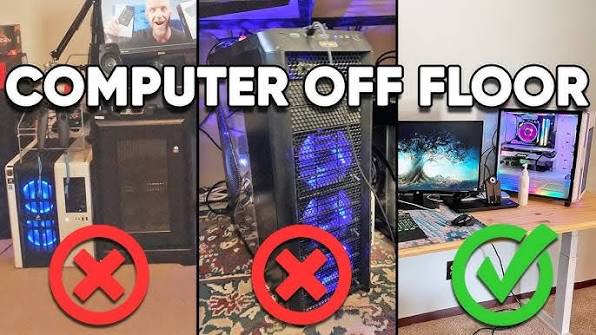
When addressing thermal issues in a high-performance computer, enthusiasts invariably look inward. They meticulously analyze BIOS voltage curves, inspect thermal paste coverage, upgrade to massive 360mm radiators, and obsess over internal case airflow pathways. However, they frequently ignore the single most absolute boundary condition governing their entire thermal architecture: the physical room the computer sits in.
A computer does not exist in a thermodynamic vacuum. No matter how much money you spend on custom liquid cooling or high-RPM industrial fans, your cooling system is physically incapable of cooling your components below the temperature of the air in your room.
Understanding the unbreakable laws of thermodynamics, recognizing the danger of localized microclimates, and optimizing the physical placement of your chassis in your workspace are zero-cost optimizations that often yield better thermal results than expensive hardware upgrades.
1. The Unbreakable Law: Delta T ($\Delta T$) and Ambient Baseline
The fundamental principle governing PC cooling is that heat moves from areas of high thermal energy to areas of low thermal energy. Your PC fans do not “generate” cold air; they merely force ambient room air over hot metal to facilitate this energy transfer.
In thermodynamics, the effectiveness of this transfer is measured by Delta T ($\Delta T$). Delta T is the mathematical difference between the ambient temperature of the room and the temperature of the PC component.
- The Shifting Baseline: If your CPU runs at 70°C when your room is a comfortable 21°C (70°F), your cooling system is maintaining a Delta T of 49°C.
- If summer arrives, your air conditioning fails, and your room temperature rises to 31°C (88°F), your CPU temperature will not stay at 70°C. It will linearly scale up by exactly that same 10-degree difference. Your CPU will now run at 80°C.
- Your thermal paste didn’t dry out, and your cooler didn’t fail. The baseline simply shifted.
Because of Delta T, benchmarking and comparing your temperatures to YouTubers or forum posts is entirely useless unless you know their ambient room temperature. If an overclocker in a 19°C basement brags about their 65°C GPU temperatures, you cannot physically replicate that result if you live in an un-air-conditioned apartment in a tropical climate, regardless of the hardware you buy.
2. The Danger of “Microclimates” (The Desk Cabinet Trap)
The ambient temperature of your room is not the same as the ambient temperature immediately surrounding your PC case. If a PC is placed poorly, it will create its own localized, blistering microclimate.
The absolute worst place to put a high-performance computer is inside the enclosed “computer cabinet” built into many traditional office desks.
- The Recirculation Loop: A modern PC exhausts massive amounts of hot air out the back. If the PC is pushed into a wooden desk cabinet with a solid back panel, that hot exhaust has nowhere to go. It hits the wood, bounces back, and is immediately sucked right back into the front intake fans of the PC.
- The Thermal Runaway: Within 15 minutes of launching a game, the air inside that wooden cabinet will rise from 21°C to 45°C. The PC is now trying to cool a 90°C graphics card using 45°C intake air. The Delta T collapses, the fans ramp to a deafening 100%, and the system will violently thermal throttle or shut down.
A high-performance PC must have a minimum of six inches (15 cm) of completely unobstructed airspace behind its exhaust fans, and the space must be open to the wider room to allow the hot air to dissipate.
3. Vertical Placement: Floor vs. Desk
Where you place the PC vertically in the room drastically affects both its thermal baseline and its maintenance cycle.
The Floor (The Dust and Carpet Penalty)
- The Temperature Gradient: Heat rises. Because of this, the air at floor level is usually 1°C to 2°C cooler than the air at desk level. From a pure, sterile thermal perspective, the floor offers slightly cooler intake air.
- The Dust Vacuum: However, the bottom 12 inches of a room contain 90% of the heavy particulates: carpet fibers, pet hair, dust mites, and dirt tracked in from shoes. A PC on the floor will ingest dust at triple the rate of a desk-mounted PC, rapidly clogging front meshes and heatsinks, obliterating any minor temperature advantage the floor provided.
- The Carpet Suffocation: As discussed in power supply maintenance, placing a modern PC directly on thick carpet will physically block the bottom intake vent for the PSU, leading to rapid power supply overheating and catastrophic failure. If a PC must live on the floor, it must be placed on a hard, rigid surface (a wooden plank, a glass mat, or a wheeled PC caddy).
The Desk (The Optimal Location)
Elevating the PC onto the desk is the universally recommended standard for enthusiasts. It elevates the intake fans above the heavy dust layer, provides massive open airspace for exhaust dissipation, and allows you to visually monitor the components (and error code LEDs) through the side panel.
4. External Heat Sources and Solar Loading
When positioning your desk and PC, you must map the external heat sources in the room.
- HVAC Radiators and Vents: Never place a PC directly next to a home heating radiator or directly under a forced-air heating vent. In the winter, this will blast 35°C+ air directly into the intake fans, crippling the cooling capacity of the system.
- Solar Loading (Direct Sunlight): Do not place a PC directly in front of a south-facing or west-facing window. A black metal and glass PC case acts exactly like a greenhouse. Direct sunlight hitting the dark chassis will absorb massive amounts of solar radiation, physically heating up the metal frame and the ambient air inside the case, regardless of how fast the fans are spinning.
5. Humidity and Environmental Extremes
While raw temperature is the primary concern, ambient humidity plays a subtle but critical role in system health.
- High Humidity (Condensation Risks): Operating a PC in an incredibly humid, non-climate-controlled environment (e.g., a garage in Florida) is generally fine while the PC is running, as the internal heat keeps components dry. However, if you use a portable AC unit to rapidly drop the room temperature, or if the PC is powered off and the temperature drops rapidly overnight, condensation can form on the metal heatsinks and motherboards, leading to short circuits when powered on.
- Low Humidity (The ESD Threat): Operating a PC in an incredibly dry environment (e.g., a heavily heated room in the dead of winter with humidity below 30%) poses a severe risk of Electrostatic Discharge (ESD). Dry air acts as an electrical insulator, allowing massive static charges to build up on your body. Simply walking across a carpet and touching a USB port on the front of the PC can discharge thousands of volts into the motherboard, causing instant system reboots or permanent damage to the USB controller.
6. Seasonal Tuning Strategies
Because ambient temperatures fluctuate wildly between summer and winter, a truly optimized system requires seasonal tuning.
- Summer Profiles: When ambient temperatures hit their peak, the thermal headroom shrinks. You may need to enter your BIOS and select a more aggressive fan curve, sacrificing acoustic silence to keep the CPU and GPU from hitting their throttling limits. This is also the time when undervolting the GPU becomes critical.
- Winter Profiles: When the ambient room temperature is freezing, you have massive thermal headroom. You can lower your fan curves significantly, allowing the PC to operate in near-total silence while still remaining perfectly cool.
Summary: The Placement Checklist
Before you spend money on new cooling hardware, verify your physical environment:
- Is it off the carpet? (Use a stand or put it on the desk).
- Does the exhaust have room to breathe? (Never push the PC flush against a wall; leave 6+ inches of clearance).
- Is it trapped in a cabinet? (Remove the back of the desk cabinet or move the PC to open air).
- Is it out of the sun and away from heaters?
- Have you accounted for the room temperature before panicking about benchmark numbers?