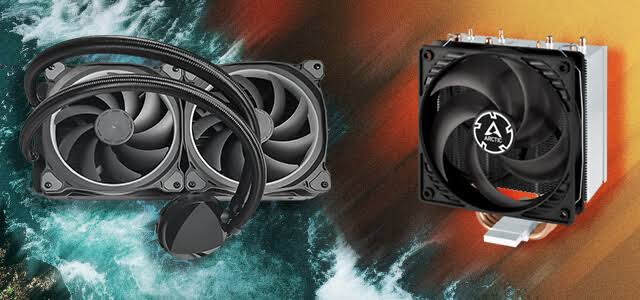
The debate over the optimal method for cooling a central processing unit (CPU) is as old as the enthusiast PC building community itself. As modern flagship processors from Intel and AMD push power limits beyond 250 watts—generating immense thermal loads in tightly packed silicon—selecting the correct cooling apparatus is no longer just an aesthetic choice; it is a critical architectural decision that directly dictates system performance, acoustic profiles, and hardware lifespan.
The market is fiercely divided into two primary categories: massive, fin-stacked Air Coolers, and sleek, enclosed All-In-One (AIO) Liquid Coolers. While both technologies ultimately rely on ambient room air to dissipate heat, the mechanism by which they transport that heat away from the CPU die is fundamentally different.
This comprehensive guide dissects the thermodynamics of both cooling methodologies, compares their thermal capacities under extreme loads, evaluates their acoustic signatures, and provides a stark analysis of their long-term reliability and failure states.
1. The Core Physics: Both Systems are “Air Coolers”
Before evaluating the hardware, it is necessary to dispel a persistent myth: liquid coolers do not magically destroy heat, nor do they refrigerate the processor. In thermodynamics, heat cannot be destroyed; it can only be moved.
Whether you use a $30 block of aluminum or a $300 liquid loop, both systems are fundamentally air coolers. Their ultimate goal is to transfer the heat generated by the CPU into the ambient air of your room. The critical difference between the two architectures is solely the transport medium used to move the heat from the CPU lid (the cold plate) to the fins where the fans can blow the heat away.
Air coolers use phase-change gas inside copper pipes as the transport medium. AIOs use liquid coolant pumped through rubber tubes.
2. The Architecture of Air Cooling: Phase-Change Physics
A modern high-end air cooler (such as the Noctua NH-D15 or Deepcool Assassin IV) is a towering structure of metal, completely devoid of mechanical pumps or moving parts, save for the attached fans.
How Air Coolers Work
While they look like solid chunks of metal, the secret to their performance lies inside the Heat Pipes. These are sealed copper tubes that run from the base plate (touching the CPU) up through the aluminum fin stack.
- Inside these pipes is a tiny amount of working fluid (usually purified water or a specialized refrigerant) operating under a strict vacuum. Because it is under a vacuum, the fluid boils at a much lower temperature than normal.
- When the CPU heats up, the fluid at the bottom of the pipe instantly boils and turns into a vapor.
- This vapor rapidly travels up the hollow pipe to the cooler aluminum fins.
- The PC case fans blow ambient air across the fins, cooling the vapor. The vapor condenses back into a liquid.
- A microscopic, textured wick (capillary action) on the inside wall of the copper pipe draws the liquid back down to the CPU block, and the cycle repeats infinitely.
The Advantages of Air Cooling
- Unmatched Reliability and Longevity: An air cooler is a passive block of metal. It has a physical lifespan that effectively outlasts human civilization. The only moving part is the plastic fan bolted to the side. If the fan dies in 10 years, you spend $15, clip a new fan on, and the cooler is instantly restored to 100% original performance. There are no pumps to fail, and zero risk of a catastrophic liquid leak destroying your $1,000 graphics card.
- Cost-to-Performance Ratio: A top-tier, $100 dual-tower air cooler will frequently match or beat the thermal performance of a $150 240mm AIO liquid cooler.
- Motherboard VRM Cooling: Because the fans are mounted directly over the CPU socket area, they create a massive amount of “splash” airflow that inadvertently cools the motherboard VRMs (power delivery components) and local M.2 NVMe SSDs.
The Disadvantages of Air Cooling
- Massive Physical Footprint: High-end air coolers are gigantic. They can weigh over 1.2 kilograms (2.6 lbs), putting significant physical stress on the motherboard socket.
- Clearance Conflicts: Their massive width often physically blocks access to the RAM slots. If you buy tall, RGB-illuminated RAM, a dual-tower air cooler may simply not fit over it, forcing you to awkwardly offset the front fan or buy low-profile memory. Furthermore, they require very wide PC cases to allow the glass side panel to close.
3. The Architecture of AIO Liquid Cooling
An All-In-One (AIO) liquid cooler replaces the bulky metal tower with a sleek, distributed system. It consists of a CPU block (which houses a microscopic copper fin array and a mechanical water pump), two flexible rubber or FEP tubes, and a large metal radiator mounted to the chassis walls.
How AIO Coolers Work
Instead of relying on capillary action and boiling vapor, an AIO relies on the immense Specific Heat Capacity of water. Water is incredibly dense and can absorb a massive amount of thermal energy before its own temperature rises.
- The mechanical pump constantly pushes a mixture of distilled water, propylene glycol (anti-freeze), and anti-corrosive inhibitors through the loop.
- The liquid flows over the microscopic fins inside the CPU block, aggressively absorbing the heat.
- The heated fluid is pushed down the tube into the radiator.
- The radiator channels the fluid through a massive, dense array of aluminum fins, where static-pressure fans blast the heat out of the case. The cooled liquid returns to the pump.
The Advantages of AIO Liquid Cooling
- Superior Thermal Capacity (for 360mm+): While a 240mm (two fan) AIO is roughly equal to a big air cooler, a massive 360mm or 420mm AIO has significantly more surface area for heat dissipation. For flagship CPUs drawing 300+ watts under full rendering loads, a 360mm AIO is often the only way to keep the processor below thermal throttling limits.
- Thermal Inertia (Spike Smoothing): Because water takes a long time to heat up, AIOs are highly resistant to sudden temperature spikes. If an air-cooled CPU suddenly opens a heavy application, the temperature instantly spikes from 40°C to 80°C. With an AIO, that same sudden workload might only raise the CPU to 55°C initially, because the large volume of water absorbs the shock. The liquid temperature will slowly rise over 10 to 15 minutes of sustained load.
- Aesthetic and Socket Clearance: AIOs leave the entire CPU socket area completely open. This allows you to show off expensive RGB memory, easily access the top PCIe slot, and eliminates the aesthetic blockiness of a giant metal tower.
The Disadvantages of AIO Liquid Cooling
- Multiple Points of Failure: An AIO is a complex mechanical system. The pump motor can burn out. The impeller can shatter. The micro-fins in the cold plate can become clogged with biological growth or sediment. And, while incredibly rare in modern units, the seals can fail, leaking conductive fluid onto your motherboard and GPU, resulting in catastrophic hardware death.
- Finite Lifespan (Permeation): Even if the pump never fails, an AIO has a strict expiration date. The rubber tubes are slightly porous at a microscopic level. Over 4 to 7 years, the liquid will slowly evaporate through the tubes in a process called permeation. Eventually, the loop will fill with too much air, the pump will run dry (cavitation), and the cooler will become completely useless and must be thrown in the trash.
- Galvanic Corrosion: Most AIOs use a copper CPU block and an aluminum radiator. Mixing these two metals in a liquid loop causes a chemical reaction where the aluminum corrodes and creates a sludge that blocks the pump. Manufacturers use heavy chemical inhibitors to delay this, but it is an inevitable chemical reality over a long enough timeline.
4. Acoustic Profiles: Which is Quieter?
The acoustic signature of a PC is heavily dependent on the cooling choice, but the “winner” is entirely dependent on the workload style.
- Under Sudden, Spiky Loads (Gaming/Browsing): Air coolers can be annoying here. Because they have very little thermal mass, a sudden spike in CPU usage causes the motherboard to instantly ramp the fan speeds to 100%, resulting in a loud “whoosh” that dies down seconds later. An AIO is superior here. Because of the water’s thermal inertia, you can set the AIO radiator fans to react to the Liquid Temperature, rather than the CPU temperature. The liquid heats up very slowly, meaning the radiator fans spin at a low, constant, imperceptible hum, ignoring sudden CPU spikes entirely.
- Under Sustained Load (Rendering): Over a 3-hour video render, the AIO liquid will eventually reach saturation (equilibrium). At this point, the radiator fans will be spinning just as fast and loud as an air cooler.
- Pump Whine: A massive acoustic drawback of AIOs is the pump. While fans can spin down to complete silence at idle, an AIO pump must run constantly (usually between 2,000 and 3,000 RPM). In a perfectly quiet room, this mechanical pump generates a high-pitched whine or humming vibration that bothers sensitive users far more than the low-frequency “whoosh” of an air cooler fan.
5. Installation and Case Compatibility
Air coolers are simple but spatially demanding. When buying a towering air cooler, you must check the “CPU Cooler Clearance” specification of your PC case. If the case supports 160mm, but the cooler is 165mm tall, the glass side panel will physically shatter if you try to force it closed.
AIOs require entirely different clearances. You must ensure your case supports the specific radiator size (240mm, 280mm, or 360mm). Furthermore, radiator placement is critical to the pump’s lifespan.
- The Golden Rule of AIOs: The pump (located on the CPU) must never be the highest point in the loop. Air bubbles naturally rise to the top. If the pump is the highest point, air will become trapped in the pump, causing excruciating grinding noises, overheating, and rapid mechanical death. A radiator should ideally be mounted to the top roof of the case, ensuring all air is trapped safely at the top of the radiator, far away from the pump.
6. The Verdict: Making the Right Choice
Choosing between air and liquid cooling is not about which is universally “better”; it is about assessing your hardware, your risk tolerance, and your aesthetic preferences.
Choose a High-End Air Cooler If:
- You are running a mid-tier or highly efficient CPU (e.g., Ryzen 5 7600, Core i5, Ryzen 7 7800X3D).
- You prioritize absolute reliability and peace of mind over a 10-year period.
- You operate mission-critical workstations where downtime caused by a dead pump is unacceptable.
- You are on a budget and want maximum performance for the lowest price.
Choose a 280mm or 360mm AIO Liquid Cooler If:
- You are running a flagship, high-wattage furnace (e.g., Intel Core i9-13900K/14900K, Ryzen 9 7950X) under heavy, sustained rendering loads.
- You prioritize a clean, open aesthetic to showcase motherboard lighting and RAM.
- You want the smoothest acoustic profile possible by tying fan curves to liquid temperature.
- You accept that the unit is a consumable part that will likely need replacing in 5 to 7 years.