Physical Address
304 North Cardinal St.
Dorchester Center, MA 02124
Physical Address
304 North Cardinal St.
Dorchester Center, MA 02124

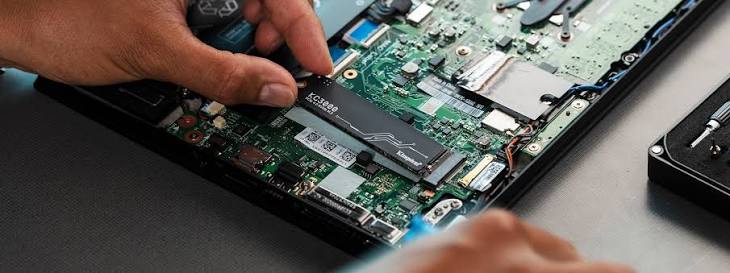
For the first few decades of personal computing, storage was the ultimate performance bottleneck. The mechanical hard disk drive (HDD), with its spinning magnetic platters and moving actuator arms, was vastly outpaced by the processing capabilities of the CPU and RAM. The introduction of SATA Solid State Drives (SSDs) removed the moving parts, but they were still heavily bottlenecked by the SATA III cable interface, which capped data transfer speeds at roughly 550 Megabytes per second (MB/s).
The storage paradigm was completely shattered by the mass adoption of the M.2 NVMe (Non-Volatile Memory Express) standard. By ditching the restrictive SATA cables and plugging directly into the motherboard’s PCIe (Peripheral Component Interconnect Express) lanes, modern NVMe SSDs can achieve staggering speeds exceeding 14,000 MB/s.
However, this astonishing leap in performance introduced a severe physical consequence that was historically reserved only for CPUs and GPUs: extreme, concentrated heat. As NVMe drives have evolved through PCIe Generations 3, 4, and 5, the debate over whether these drives require dedicated heatsinks has shifted from a question of aesthetics to a matter of critical system stability. This comprehensive guide dissects the anatomy of an NVMe drive, explains the paradox of NAND flash temperatures, and provides a definitive answer on when a heatsink is strictly mandatory.
To understand how an NVMe drive heats up and why it throttles, you must understand that an M.2 SSD is not a single unified processor. It is a miniature circuit board comprising two fundamentally different primary components, and each component reacts to heat in completely opposite ways.
The controller is a highly advanced, multi-core micro-processor located near the gold connector pins of the M.2 drive. Its job is to manage the complex algorithms required to route data, calculate error correction (ECC), manage wear-leveling, and address the massive influx of data coming from the PCIe lanes.
Taking up the majority of the physical space on the M.2 stick are the NAND flash memory modules. These are the physical black rectangular chips where your data actually resides, stored as trapped electrons inside microscopic insulated floating gates.
Because the M.2 form factor is incredibly constrained (measuring only 22mm wide by 80mm long), the massive heat generated by the controller rapidly spreads across the entire PCB, threatening to overheat the entire drive.
When an NVMe drive operates under a heavy, sustained workload—such as moving a 200GB folder of 4K video files, or installing a massive modern video game—the temperature of the controller skyrockets.
The drive will remain in this crippled state until the controller temperature drops back down to a safe equilibrium, at which point it will restore full speed (until it inevitably overheats again a few minutes later).
The necessity of a heatsink is entirely dependent on the PCIe Generation of your NVMe drive. As the PCIe standard doubles its bandwidth with every generation, the power draw—and consequently, the heat—scales dramatically.
If you have determined that your drive requires a heatsink, you must navigate the various cooling solutions available on the market, ranging from simple aluminum plates to complex active coolers.
Almost all mid-range to high-end motherboards (B650, X670, Z790) now include integrated M.2 heatsinks. These are thick plates of aluminum designed to match the motherboard’s aesthetic, featuring a strip of thermal padding on the underside.
If your motherboard does not have an M.2 shield, or you are adding a secondary drive to a bare slot, you must purchase an aftermarket heatsink (like the EKWB M.2 heatsink or a BeQuiet! MC1).
Designed strictly for top-tier Gen 4 and modern Gen 5 drives, these resemble miniature CPU coolers, featuring copper heat pipes and tiny 20mm PWM fans.
Because PC enthusiasts have been conditioned to believe that “colder is always better,” there is a dangerous tendency to try and over-cool NVMe drives.
As established earlier, NAND flash memory degrades faster if it is written to while ice-cold. If you place a massive active cooler on a drive and manage to chill the NAND flash down to 25°C while you are writing hundreds of gigabytes of data to it, you are actively accelerating the physical wear and tear of the storage cells. Furthermore, NAND flash actually retains data longer when it is stored at slightly higher idle temperatures.
The Thermal Goldilocks Zone:
How to achieve this: The perfect M.2 heatsink installation accounts for this difference. When applying the thermal pad to the underside of your heatsink, you should ensure the thermal pad makes firm, direct contact with the small Controller chip. However, some advanced enthusiasts will intentionally leave a slight gap (or use a thinner, less conductive pad) over the NAND flash chips. This pulls the lethal heat away from the controller while allowing the NAND flash to retain the gentle warmth it requires for optimal electrical endurance.
If you are using a standard, uniform thermal pad provided by a motherboard manufacturer, do not panic; it will still work perfectly fine. The passive aluminum heatsink will distribute the heat efficiently enough to keep the controller from throttling without artificially chilling the NAND down to freezing temperatures.
The requirement for NVMe heatsinks extends beyond desktop PCs directly into the console space. When Sony unlocked the secondary M.2 storage expansion slot on the PlayStation 5, they published a highly rigid set of technical requirements.
Sony explicitly mandates that any PCIe Gen 4 NVMe drive installed in the PS5 must have a heatsink attached.
The question of whether an NVMe SSD needs a heatsink is no longer a matter of opinion; it is dictated entirely by the PCIe generation and the specific workload.
If you are building a modern PC utilizing PCIe Gen 4 or Gen 5 drives, a heatsink is a mandatory requirement, not an optional accessory. Relying on the integrated shields provided by your motherboard is generally the best, most compatible path. However, when building in restrictive environments like Small Form Factor (SFF) ITX cases or upgrading a PlayStation 5, careful attention must be paid to heatsink dimensions and active case airflow to ensure your lightning-fast storage doesn’t cripple itself under the weight of its own thermal footprint.




