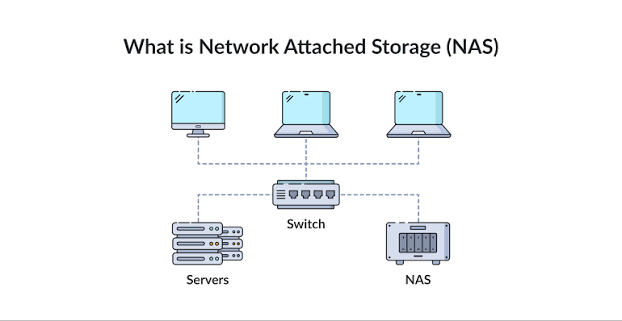
As storage demands scale beyond the capacity of a single machine, Direct Attached Storage (DAS)—such as internal hard drives or USB enclosures—becomes fundamentally inadequate. When a cluster of servers, a fleet of office workstations, or a distributed containerized application needs simultaneous access to a centralized pool of data, the storage must be decoupled from the compute nodes and moved onto the network.
However, simply plugging a storage array into an Ethernet switch is only the physical layer of the equation. How the operating systems communicate across that wire dictates the performance, latency, security, and ultimate capabilities of the entire infrastructure.
This comprehensive guide explores the critical architectural divide between file-level and block-level storage, and dissects the core network protocols—SMB, NFS, and iSCSI—used to route terabytes of data seamlessly across modern local area networks.
1. The Architectural Divide: NAS vs. SAN
Before selecting a transmission protocol, storage engineers must define the architectural relationship between the client computer and the storage array. All network storage falls into one of two fundamental categories: File-Level (NAS) or Block-Level (SAN).
Network Attached Storage (NAS): File-Level Access
A NAS is essentially a dedicated computer on the network that manages its own internal file system (like EXT4, ZFS, or Btrfs).
- The Mechanism: When a client PC requests data from a NAS, it does not ask for raw binary data blocks. Instead, it asks for a specific file (e.g., “Give me
financial_report.pdf from the /Accounting directory”). The NAS processor looks up the file in its own index, retrieves the raw data blocks from its drives, packages them into a file, and sends the file over the network to the client.
- The Advantage: It is designed for sharing. Because the NAS manages the file system, fifty different Windows, macOS, and Linux computers can open, read, and write files in the same directory simultaneously without corrupting the data structure.
- The Limitation: Overhead. The NAS processor must handle all file system indexing, permissions, and locking, which introduces slight processing latency.
Storage Area Network (SAN): Block-Level Access
A SAN takes a radically different approach. It provides the client computer with raw, unformatted blocks of storage capacity over the network.
- The Mechanism: The storage array does not format the drives or manage files. It simply presents a blank chunk of capacity (a LUN – Logical Unit Number) to the client server. The client server formats that network capacity with its own local file system (like NTFS or EXT4). When the client needs data, it requests raw block addresses (e.g., “Give me blocks 8,000 through 8,050”).
- The Advantage: Absolute speed and low latency. Because the client operating system treats the SAN storage exactly as if it were a physical hard drive plugged directly into its own motherboard, it bypasses the file-sharing overhead of a NAS.
- The Limitation: Standard file systems (like NTFS) are not “cluster-aware.” If you mount the same block-level SAN volume to two different Ubuntu servers simultaneously, both servers will attempt to write to the same sectors without telling each other, instantly destroying the file system. SANs are generally mounted in a 1-to-1 relationship (one volume to one server) unless highly specialized clustered file systems are used.
2. SMB / CIFS: The Enterprise File Sharing Standard
SMB (Server Message Block), historically known as CIFS, is the native file-sharing protocol for Microsoft Windows, though it is universally supported by macOS and Linux (via Samba). It operates at the Application layer and relies heavily on TCP/IP.
The Evolution of SMB
- SMBv1 (The Security Disaster): Created in the 1980s, SMBv1 is notoriously insecure. It was the exact vulnerability exploited by the devastating WannaCry ransomware attack in 2017. Modern networks must aggressively disable SMBv1 across all devices.
- SMBv3 (The Modern Standard): Introduced with Windows 8/Server 2012, SMBv3 transformed the protocol into a high-performance enterprise powerhouse. It introduced end-to-end AES encryption over the wire, protecting file transfers from network sniffing.
SMB Multichannel: Breaking the Gigabit Barrier
Historically, if a server had four 1-Gigabit network cards, a single file transfer could still only utilize one cable (maxing out at 125 MB/s). Setting up Link Aggregation (LACP) required complex configurations on managed switches. SMB Multichannel revolutionized this. If both the client and the NAS have multiple network interfaces, SMBv3 automatically detects them and stripes a single file transfer simultaneously across multiple IP addresses without any switch configuration. Two 1-Gigabit cables instantly yield 250 MB/s throughput, maximizing the hardware’s physical limits.
3. NFS: The High-Speed Unix/Linux Backbone
NFS (Network File System) is the native file-sharing protocol for Unix and Linux environments. Developed by Sun Microsystems, it is heavily favored in enterprise data centers, homelabs, and cloud infrastructure for its incredibly low overhead and blazing fast performance.
Why Linux Environments Prefer NFS
Unlike SMB, which carries heavy computational overhead to handle Windows-specific Access Control Lists (ACLs) and complex locking mechanisms, NFS is brutally efficient. When building a distributed web infrastructure—such as a cluster of Ubuntu servers running Docker containers behind an Nginx load balancer—maintaining persistent data across all nodes is critical. Mounting a central NAS directory via NFS allows all Docker swarm nodes to instantly read and write to the same shared web root or application configuration files with vastly lower latency than SMB.
NFS Versions and Stateful vs. Stateless Operations
- NFSv3: Still widely used due to its simplicity. It is a “stateless” protocol, meaning the server does not keep track of which clients have which files open. If the NFS server reboots, the client simply retries the connection until the server comes back online, making it highly resilient to network blips. However, it relies heavily on client-side IP trusting for security, making it inappropriate for untrusted networks.
- NFSv4: A massive architectural shift. It is a “stateful” protocol, managing file locks actively. More importantly, it consolidates communication over a single TCP port (Port 2049), making it vastly easier to route through restrictive firewalls. NFSv4 also integrates with Kerberos for robust cryptographic user authentication.
The “Root Squash” Security Feature
By default, if a user with root (administrator) privileges on a client Linux machine mounts an NFS share, they could theoretically write files to the NAS as the NAS’s own root user, creating a massive security vulnerability. NFS utilizes Root Squash, a feature that automatically downgrades any incoming root requests to a restricted, unprivileged user (like nobody), ensuring a compromised client server cannot hijack the centralized storage array.
4. iSCSI: Bringing SAN Architecture to Ethernet
Fibre Channel used to be the only way to build a high-speed Block-Level SAN, requiring incredibly expensive, specialized fiber optic cables and switches. iSCSI (Internet Small Computer Systems Interface) changed the industry by allowing SCSI storage commands to be wrapped inside standard TCP/IP packets and routed over normal, inexpensive Ethernet networks.
The Initiator and the Target
iSCSI terminology replaces “Client” and “Server”:
- The Target: The centralized storage array (the SAN or a NAS running iSCSI software) that hosts the raw storage volumes (LUNs).
- The Initiator: The client machine (e.g., a database server or a VMware ESXi hypervisor) that connects to the Target.
The Illusion of Local Storage
When an Initiator connects to an iSCSI Target, a remarkable thing happens in the operating system. If you open Windows Disk Management or Linux fdisk, the iSCSI volume appears exactly as if a brand new, unformatted physical hard drive was just bolted into the chassis. The operating system has no idea the drive is sitting on a server rack three rooms away. It formats the volume with its own local file system and installs applications directly to it.
Optimal Use Cases for iSCSI
- Virtualization (Hypervisors): Systems like Proxmox or VMware ESXi rely heavily on iSCSI to store virtual machine disks (
.vmdk or .qcow2). Because iSCSI is block-level, the hypervisor can rapidly write raw memory pages and disk sectors directly to the array without negotiating with a file system layer.
- Enterprise Databases: High-transaction databases (like Microsoft SQL Server or PostgreSQL) execute thousands of tiny read/write operations per second. iSCSI handles these High IOPS (Input/Output Operations Per Second) workloads significantly better than SMB or NFS.
- Bypassing Software Limitations: Some specific enterprise software completely refuses to install on “Network Drives” mapped via SMB. Because iSCSI fools the OS into seeing a physical local drive, the software installs flawlessly.
5. Advanced Network Considerations for Storage
Pushing terabytes of storage traffic over an Ethernet network requires specific infrastructural optimizations to prevent the network itself from becoming a bottleneck.
- Dedicated Storage Networks: Storage traffic should never share the same network pathway as standard user web-browsing traffic. IT administrators physically isolate storage traffic onto its own dedicated switches, or logically isolate it using Virtual LANs (VLANs), to prevent broadcast storms and prioritize storage packet routing.
- Jumbo Frames (MTU 9000): Standard Ethernet networks chop data into small packets called frames, usually carrying a Maximum Transmission Unit (MTU) of 1500 bytes. For massive file transfers, chopping a 50GB file into 1500-byte pieces wastes immense CPU power processing packet headers. Enabling “Jumbo Frames” increases the MTU to 9000 bytes, allowing the network cards to send data in massive chunks, drastically lowering CPU overhead and increasing total throughput. (Note: Jumbo Frames must be explicitly enabled on the client PC, the network switch, and the storage array simultaneously; if one device is mismatched, the connection will drop).
- Beyond Gigabit: Modern NVMe SSD arrays can read data at 10,000 MB/s. A standard 1-Gigabit Ethernet connection bottlenecks at 125 MB/s. Deploying network storage today requires upgrading backbone infrastructure to 10GbE (Copper/SFP+), 25GbE, or even 100GbE to ensure the network does not choke the performance of the flash storage holding the data.